


In today’s fast-paced world, managing your time effectively is no longer a luxury but a necessity. Traditional calendars, while useful, often fall short when faced with the dynamic nature of our daily lives – unexpected meetings, changing priorities, and the constant juggle of professional and personal commitments. This is where FlowSavvy steps in, promising to transform your approach to productivity with its innovative AI-powered dynamic scheduling. In this comprehensive review, we’ll dive deep into what makes FlowSavvy a game-changer for anyone looking to reclaim their time and mental energy.
What is FlowSavvy? An AI-Powered Scheduling Marvel
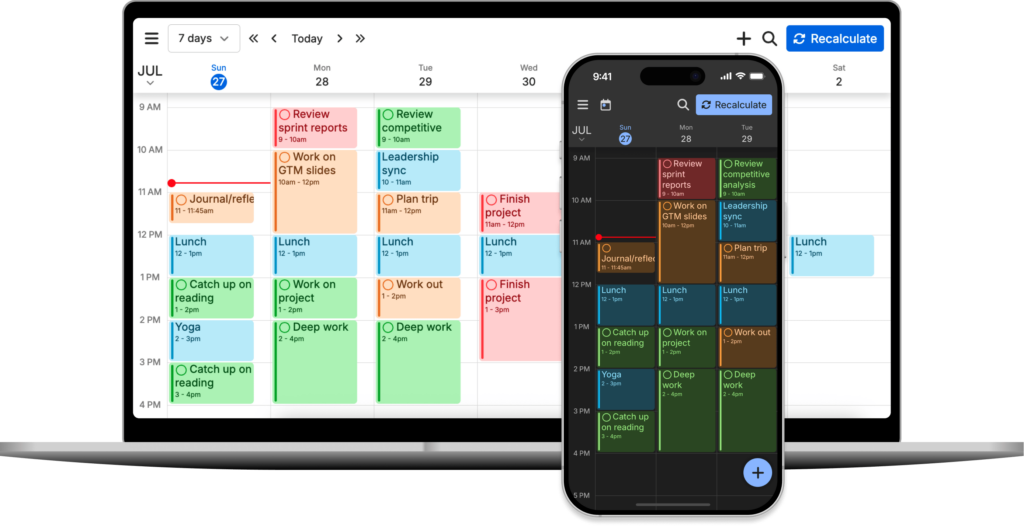
At its core, FlowSavvy is an intelligent calendar and task manager designed to automate the most tedious aspects of scheduling. Unlike static calendars that simply display your pre-set appointments, FlowSavvy leverages artificial intelligence to dynamically arrange your tasks around your existing schedule, adapting instantly to changes. Imagine a personal assistant tirelessly optimizing your day, ensuring every task finds its perfect slot without you lifting a finger.
The app integrates seamlessly with your existing Google or Outlook Calendars, pulling in your fixed events and then intelligently weaving your to-do list into the available gaps. This isn’t just about putting tasks on a calendar; it’s about optimizing their placement based on priority, duration, and your personal availability, ensuring you always know what to work on next and when.
Key Features That Set FlowSavvy Apart
1. AI-Powered Dynamic Rescheduling
This is FlowSavvy’s flagship feature and its most compelling differentiator. Traditional time blocking requires manual adjustments every time a new meeting pops up or a task runs longer than expected. FlowSavvy eliminates this friction. If an unforeseen event arises, or if you simply need to postpone a task, FlowSavvy automatically shuffles your entire schedule, finding new optimal slots for everything else. This proactive adaptation is what truly frees up your mental load, allowing you to focus on the task at hand rather than constantly managing your calendar.
- Automatic Adjustments: New events? Missed a task? FlowSavvy reschedules everything else for you.
- Optimal Placement: Tasks are placed when you have the most focused time, considering breaks and commitments.
- Stress Reduction: Say goodbye to the anxiety of a packed, unmanageable schedule.
2. Effortless Task Management and Prioritization
Adding tasks to FlowSavvy is intuitive. Simply type out your to-dos, specify their duration, and set a deadline. FlowSavvy then takes these inputs and strategically places them within your calendar. You can easily set priorities, ensuring that critical tasks are always given precedence. This intelligent task allocation means you’re always working on what matters most, without having to manually decide when to start each item.
The ability to drag-and-drop tasks directly onto your calendar provides a tactile and visual way to manage your day, giving you both AI-powered automation and manual control when you want it.
3. Seamless Calendar Integration (Google & Outlook)
FlowSavvy isn’t another siloed productivity app. It’s designed to augment your existing calendar ecosystem. By integrating directly with Google Calendar and Outlook Calendar, it ensures that your FlowSavvy schedule is always in sync with your primary calendar. This means:
- Your FlowSavvy tasks appear alongside your meetings and appointments in your native calendar app.
- Any changes made in FlowSavvy are reflected in your integrated calendar, and vice-versa.
- You don’t need to switch between multiple apps to get a complete view of your day.
4. Focus and Flow States
By intelligently blocking out time for your tasks, FlowSavvy helps you achieve “flow states” – periods of deep, uninterrupted concentration. The app’s dynamic scheduling ensures that once you start a task, you’re less likely to be interrupted by the mental burden of wondering what to do next or how to fit everything in. It creates a structured environment conducive to deep work, a critical component of modern productivity.
5. Customizable Scheduling Preferences
While FlowSavvy’s AI is powerful, it also respects your personal preferences. You can set specific times you prefer to work, specify your ideal break durations, and even block out certain hours as unavailable. This ensures that the AI’s scheduling aligns with your natural rhythms and work style, rather than imposing a rigid structure.
Who Can Benefit Most from FlowSavvy?
FlowSavvy is a versatile tool, perfect for a wide range of individuals and professionals:
- Busy Professionals: Juggling multiple projects, meetings, and deadlines can be overwhelming. FlowSavvy simplifies this complexity.
- Freelancers & Consultants: Managing client work, administrative tasks, and personal life often requires intricate planning. FlowSavvy provides the flexibility needed.
- Students: Keeping track of assignments, study sessions, and extracurriculars becomes effortless.
- Project Managers: While not a full-fledged project management suite, it helps managers personally organize their own tasks and contributions within a larger project.
- Anyone Struggling with Time Management: If you constantly feel overwhelmed, miss deadlines, or struggle to prioritize, FlowSavvy offers a structured yet adaptable solution.
Getting Started with FlowSavvy: A Simple Path to Productivity
Embracing FlowSavvy’s intelligent scheduling is remarkably straightforward:
- Sign Up: Head over to the FlowSavvy website and start your free trial.
- Connect Your Calendar: Link your Google or Outlook Calendar in a few simple clicks.
- Add Your Tasks: Input your to-do list, specifying duration, deadlines, and priority levels.
- Let AI Do the Work: Watch as FlowSavvy intelligently populates your calendar, optimizing your schedule.
- Adapt and Conquer: Enjoy the freedom of a dynamically adjusting schedule that keeps pace with your life.
The initial learning curve is minimal, and the benefits of an optimized, stress-free schedule are almost immediate. We highly recommend trying it out to experience the difference firsthand.
FlowSavvy Pricing: Investing in Your Productivity
FlowSavvy offers a free 2-week trial period, allowing you to fully explore its features and experience its impact on your productivity without commitment. After the trial, you’ll need to upgrade to a paid plan to continue using its advanced dynamic scheduling capabilities. While specific pricing details are best found on their official website (as they can change), consider the investment in FlowSavvy as an investment in your mental well-being, efficiency, and ability to achieve your goals without burnout.
For individuals and teams serious about optimizing their time, the value proposition of a tool that continuously organizes your day and reduces decision fatigue is significant.
Pros and Cons of FlowSavvy
Pros:
- True Dynamic Scheduling: The standout feature; automatically adjusts your entire schedule with changes.
- Reduced Mental Load: Frees you from constant rescheduling and task prioritization.
- Seamless Calendar Integration: Works effortlessly with Google and Outlook Calendars.
- Intuitive Interface: Easy to add tasks and visualize your schedule.
- Increased Focus: Promotes deep work by intelligently blocking out time.
- Highly Customizable: Allows you to set personal preferences for scheduling.
- Boosts Productivity: Ensures you’re always working on the most important tasks.
Cons:
- Learning Curve for AI Concepts: While the app is easy to use, understanding how best to leverage AI scheduling might take a little adjustment for some users.
- Reliance on External Calendar: Requires integration with Google or Outlook, which is a strength but means it’s not a standalone calendar.
- Subscription Cost: After the trial, it requires a paid subscription, which might not suit those looking for a completely free solution.
- No Native Mobile App (as of writing): While the web app is responsive, a dedicated mobile app often offers a smoother, more integrated experience. (Note: Always check the FlowSavvy website for the most current information regarding app availability.)
FlowSavvy vs. Traditional Time Blockers
Many productivity tools offer time blocking, where you manually allocate specific time slots for tasks. FlowSavvy elevates this concept through its AI. Traditional time blocking requires constant manual intervention – if a meeting shifts, you have to manually move all subsequent blocks. FlowSavvy’s dynamic nature means it does this for you automatically, making it far more adaptable to the real world’s unpredictability. It’s the difference between driving a car with a stick shift and driving one with an automatic transmission that also anticipates traffic changes and recalculates your route in real-time.
Final Verdict: Embrace the Future of Scheduling with FlowSavvy
FlowSavvy isn’t just another calendar app; it’s a paradigm shift in how we approach time management. By harnessing the power of AI and automation, it removes the friction and mental overhead associated with traditional scheduling, allowing you to focus your energy on meaningful work rather than logistics. The promise of FlowSavvy – to free up your mind, adapt to changes, and help you focus on what truly matters – is not just met but exceeded.
If you’re tired of feeling overwhelmed by your to-do list, constantly rescheduling tasks, and wishing for more hours in the day, FlowSavvy offers a powerful, intelligent solution. Take advantage of their free trial and experience the profound impact of truly smart scheduling. Your future, more productive self will thank you.
Ready to revolutionize your time and unlock peak productivity? Give FlowSavvy a try today!