



In an increasingly digital world, clear communication is paramount. Whether you’re a remote worker, an online educator, a podcaster, or just someone who spends a lot of time on virtual calls, background noise can be a relentless adversary. Enter Krisp AI, a groundbreaking application that leverages artificial intelligence to silence the chaos, delivering pristine audio quality for all your online interactions. But how effective is it, and is it truly the game-changer it claims to be? Let’s dive deep into this comprehensive Krisp AI review.
What is Krisp AI? The Silent Revolution in Audio
Krisp is an AI-powered noise cancellation software designed to eliminate unwanted background noise from both ends of a conversation. Unlike traditional noise suppression tools built into communication platforms, Krisp works at a deeper level, utilizing advanced deep neural networks to distinguish human voices from environmental sounds. This means it can remove everything from a barking dog, a screaming child, keyboard clicks, office chatter, street noise, and even the hum of air conditioning, ensuring that only your voice—or the voice of the person you’re listening to—comes through crystal clear.
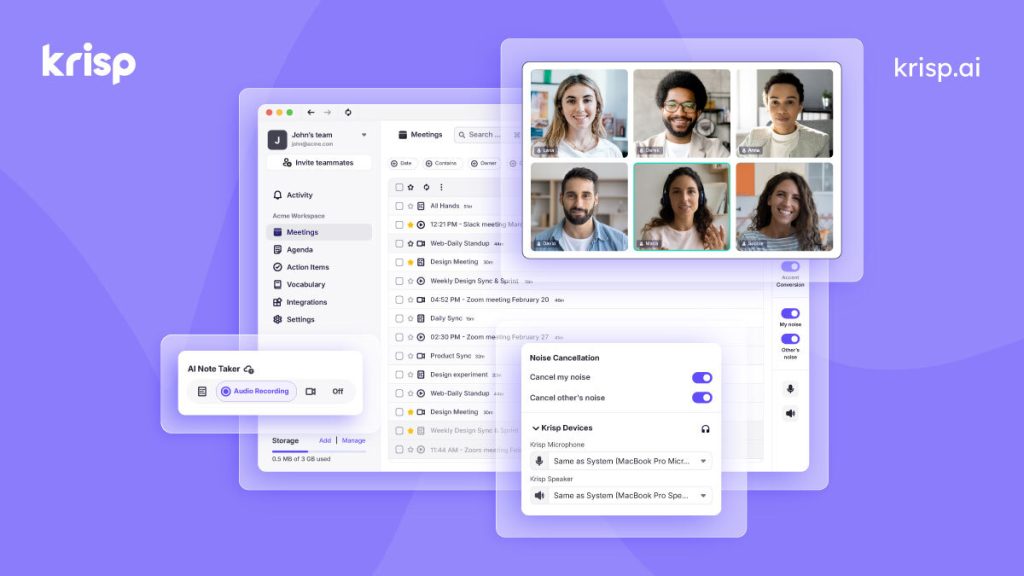
It acts as a virtual microphone and speaker, sitting between your physical audio devices and any communication app you use. This universal compatibility is one of its most significant strengths, allowing it to seamlessly integrate with hundreds of applications, from Zoom and Microsoft Teams to Skype, Google Meet, Discord, and even recording software.
Key Features That Make Krisp Stand Out
Krisp isn’t just a one-trick pony; it comes packed with features designed to enhance every aspect of your audio experience:
- Noise Cancellation (Microphone): This is Krisp’s flagship feature. It identifies and filters out all non-human sounds before they even reach your audience. The result is a professional-sounding output, even if you’re working from a bustling coffee shop or a busy home environment.
- Noise Cancellation (Speaker): Equally impressive, Krisp can also remove background noise coming from the other participants in your call. If someone on your team has a noisy dog or a loud neighbor, Krisp can clean up their audio so you can focus purely on their message.
- Echo Removal: Say goodbye to annoying room echoes that make calls sound hollow and unprofessional. Krisp’s AI intelligently suppresses echoes, making your voice sound natural and direct, regardless of your acoustic environment.
- Voice Clarity: Beyond just removing noise, Krisp also enhances the clarity and presence of human voices, making conversations easier to understand, especially during crucial meetings or interviews.
- Speaker Noise Cancellation (Beta): A newer feature that specifically targets the removal of noise originating from the speakers, improving your listening experience by filtering out distractions from your interlocutors’ end.
- Room Echo Removal (Beta): This feature further refines audio quality by specifically tackling echo issues from the room environment itself, providing a crisper sound.
- Wide Compatibility: As mentioned, Krisp integrates with virtually any communication, streaming, or recording application on Windows, macOS, and soon Linux and mobile platforms.
- Privacy-Centric Design: Krisp processes all audio locally on your device, meaning no audio data ever leaves your computer. This commitment to privacy is a major advantage, especially for businesses dealing with sensitive information.
How Does Krisp’s AI Technology Work?
The magic behind Krisp lies in its deep neural network technology. Unlike simple gate or filter-based noise reduction, Krisp’s AI has been trained on tens of thousands of hours of audio, encompassing a vast array of human voices and environmental noises. This extensive training allows it to learn the unique “fingerprint” of a human voice and effectively separate it from everything else.
When you speak, Krisp analyzes the audio in real-time, identifying what’s speech and what’s noise. It then intelligently removes the noise component, leaving behind only your clear voice. This sophisticated approach ensures that the noise cancellation is highly effective without distorting your voice, which can be a common problem with less advanced solutions.
Who Can Benefit Most from Krisp AI?
Krisp is a versatile tool that can enhance communication for a wide range of users:
- Remote Workers & Digital Nomads: Essential for maintaining professionalism during virtual meetings, client calls, and team collaborations, no matter where you’re working from.
- Online Educators & Students: Ensures clear instruction delivery and focused learning environments, free from distractions.
- Customer Support & Call Center Agents: Improves call quality, leading to better customer satisfaction and reduced misunderstandings.
- Podcasters & Streamers: Delivers studio-quality audio without needing expensive soundproofing, making content more engaging.
- Gamers: Enhances in-game communication by eliminating background noise from teammates, leading to better coordination.
- Journalists & Interviewers: Captures cleaner audio for interviews, simplifying transcription and editing processes.
- Anyone in Online Meetings: From casual catch-ups to critical business presentations, Krisp elevates the quality of every interaction.
Pros of Using Krisp AI
After extensive testing and user feedback, here are the compelling advantages of incorporating Krisp into your workflow:
- Unparalleled Noise Cancellation: It truly lives up to its promise, silencing even the most challenging background noises with remarkable accuracy.
- Effortless Setup & Use: Installation is quick, and configuring it with your communication apps is straightforward. It essentially becomes a “set it and forget it” tool.
- Universal Compatibility: Works with virtually all communication and recording applications, making it incredibly flexible.
- Significant Productivity Boost: By eliminating distractions and ensuring clear communication, Krisp contributes directly to more focused and productive meetings.
- Enhanced Professionalism: Projects a more polished and professional image during calls, regardless of your physical environment.
- Strong Privacy Protection: Local audio processing means your conversations remain private and secure.
- Improved Listening Experience: Not only does it clean your outgoing audio, but it also cleans incoming audio, reducing listener fatigue.
Cons of Using Krisp AI
While Krisp is highly effective, it’s important to consider potential downsides:
- Subscription Model: While there’s a generous free tier, unlocking unlimited usage requires a paid subscription. For some casual users, this might be a consideration.
- Minor Resource Usage: Like any software running in the background, Krisp consumes some CPU resources. On very old or underpowered machines, this *might* be noticeable, though it’s generally very efficient.
- Occasional Over-Processing (Rare): In very rare instances, particularly with unusual or very soft voices combined with extreme background noise, Krisp might occasionally over-process, making voices sound slightly robotic. However, these instances are few and far between and continuously being improved.
Krisp Pricing & Plans
Krisp offers flexible pricing tiers to suit different needs:
- Free Plan: A great way to try out Krisp, offering a limited number of noise-free minutes per day. This is perfect for light users or those wanting to experience its power before committing.
- Pro Plan: Designed for individual professionals, offering unlimited noise cancellation, echo removal, and all features. This is the sweet spot for most remote workers and content creators.
- Business Plan: Tailored for teams and organizations, providing centralized billing, user management, and dedicated support.
Given the immense value Krisp brings in terms of communication quality and professionalism, the Pro plan offers excellent value for money.
Is Krisp AI Worth It? The Verdict
Absolutely. In the realm of automation and AI, Krisp AI stands out as a practical, impactful, and almost essential tool for anyone regularly engaging in online communication. It consistently delivers on its promise of crystal-clear audio, transforming chaotic environments into professional soundscapes.
For remote professionals, content creators, or anyone tired of saying “Can you repeat that?” due to background distractions, Krisp is a game-changer. It’s not just a convenience; it’s an investment in your productivity, professionalism, and peace of mind.
If you’re seeking to elevate your virtual presence and ensure every word is heard, Krisp AI is undoubtedly worth exploring.
Conclusion: Silence the Noise, Amplify Your Voice
Krisp AI has firmly established itself as a leader in the noise cancellation arena, leveraging the power of artificial intelligence to solve a pervasive problem of modern communication. Its ability to flawlessly filter out distracting noises from both ends of a call is nothing short of revolutionary, fostering clearer, more efficient, and ultimately more enjoyable online interactions.
Don’t let background noise compromise your message or your professional image any longer. Experience the transformative power of AI-driven audio clarity.
Ready to make every conversation clearer? Try Krisp AI today and discover the difference!
Frequently Asked Questions (FAQs)
1. Does Krisp AI work with all applications?
Yes, Krisp AI is designed for universal compatibility and works with virtually any communication, streaming, or recording application that uses a microphone or speaker, including Zoom, Microsoft Teams, Slack, Skype, Google Meet, Discord, OBS, and many more.
2. Is Krisp AI free to use?
Krisp offers a free plan with a limited number of noise-free minutes per day. For unlimited usage and full features, paid Pro and Business plans are available.
3. Is Krisp AI secure and private?
Yes, Krisp prioritizes privacy. All audio processing happens locally on your device. No audio data is sent to Krisp’s servers, ensuring your conversations remain private and secure.
4. How much CPU does Krisp AI use?
Krisp is optimized for efficiency. While it uses some CPU for real-time AI processing, it’s generally minimal and designed not to significantly impact overall system performance, even on moderately powered computers.
5. Can Krisp AI remove a human voice from background?
No, Krisp is specifically designed to isolate and transmit human voices while removing *non-human* background noises. It cannot filter out other human voices in the background, only environmental sounds, echo, and static noise.